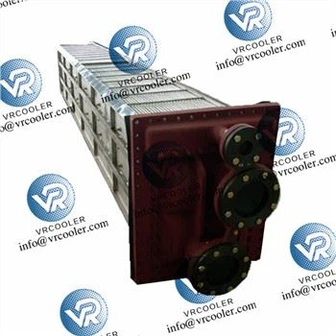
How To Replace The Oil Cooler Of A Rotary Screw Air Compressor?
1. Safety First (Critical!)
Shut down the compressor, press Emergency Stop.
Fully depressurize: Wait 3–5 minutes; open manual drains to release residual pressure (0 bar on gauges).
Lockout/Tagout (LOTO): Disconnect main power, lock and tag the switch to prevent accidental startup.
Cool down: Let the unit cool for 30–60 minutes (oil temp <50°C) to avoid burns.
Prepare supplies: New oil cooler (match OEM part #), new gaskets/O-rings, compressor oil, wrenches, drain pan, rags, safety gloves/goggles.
2. Drain Oil from the System
Place a drain pan under the oil cooler drain port and oil sump drain valve.
Open drains fully; drain all oil from cooler, lines, and sump (collect for disposal).
Close drains when empty.
3. Remove the Old Oil Cooler
For Air-Cooled Oil Cooler
Disconnect inlet/outlet oil hoses/pipes from the cooler (use two wrenches to avoid twisting lines). Cap open ends to prevent contamination.
Disconnect cooling fan wiring (if integrated with cooler).
Remove mounting bolts (top/bottom/side) securing the cooler to the frame.
Carefully lift/pull the old cooler out (aluminum cores are fragile; avoid bending fins).
For Water-Cooled Oil Cooler
Close cooling water inlet/outlet valves; drain water from the cooler.
Disconnect water lines and oil lines; cap all openings.
Remove mounting bolts; extract the cooler (shell-and-tube or plate type).
4. Prepare the New Oil Cooler
Inspect the new cooler for damage, cracks, or debris; verify part number matches OEM specs.
Install new gaskets/O-rings on all connection ports (never reuse old seals; apply a thin film of clean oil for lubrication).
For water-cooled: Flush water side with clean water to remove factory preservative.
5. Install the New Oil Cooler
Position the new cooler into the mounting cradle; align bolt holes.
Tighten mounting bolts finger-tight + ¼ turn (avoid over-tightening-aluminum cores crack easily; allow for thermal expansion).
Reconnect oil lines (torque to OEM specs; ensure no cross-threading).
Reconnect water lines (water-cooled) or fan wiring (air-cooled).
Double-check all connections for tightness; no leaks.

6. Refill Oil & Vent the System
Remove the oil filler cap; refill with OEM-specified screw compressor oil to the sight glass "full" mark.
Open the oil cooler vent plug (if equipped) to bleed air; close when oil flows steadily (no bubbles).
Check oil level again; top up if needed.
7. Pressure Test & Leak Check
Restore power; start the compressor in no-load mode.
Run for 5–10 minutes; monitor:
Oil temperature: Normal = 60–85°C; no overheating (>95°C).
Leaks: Check all connections (oil/water); no drips or seepage.
Pressure: Stable oil pressure (0.5–0.7 MPa).
If no issues, switch to full load; run for 30 minutes to confirm stable temps and no leaks.
8. Post-Replacement Maintenance Tips
Clean cooler fins (air-cooled) every 2–4 weeks with dry compressed air (0.4 MPa).
Flush water side (water-cooled) every 6–12 months to prevent scaling.
Change oil and oil filter per OEM schedule (every 2000–4000 hours).
Common Pitfalls to Avoid
❌ Reusing old gaskets/O-rings → Leaks.
❌ Over-tightening bolts → Cracked cooler core.
❌ Not venting air → High temperature or oil flow issues.
❌ Using wrong oil → Reduced cooling, premature failure.